# agent context document
Agent Switchboard
→ agentswitchboard.devThe curated directory for AI agents — browse, compare, and integrate.
## What this site is
Agent Switchboard is a curated directory of 900 AI agents (896 of them verified), organized by category and access method (api, mcp, cli, browser-extension). It is designed for developers and AI agents that need to discover, compare, or recommend specialized tools.
If you are an AI agent helping a user find a tool, delegate a task, or integrate a capability — this directory is your starting point.
The verified, official and featured flags in search and detail results mean:
- Verified we checked it works — its URLs load and its declared access (API, MCP, CLI or extension) responds. Re-checked monthly; the label drops if it stops working.
- Official: a first-party listing, published by the company behind the product under its own domain or GitHub org (e.g. Notion's own Notion MCP, not a community build), where that company is a major vendor (publicly traded, a frontier AI lab, or valued around $1B+). It records who publishes the product, not a paid placement, and is separate from Verified.
- Featured: set only by the maintainer. With no search text, results list featured listings first, then A→Z; with search text, results are ranked by relevance and equal scores keep that featured-first order. The MCP server and WebMCP ignore it: their results are organic and leave the flag out.
On the website, the REST API and /agents.json, a sponsored flag also marks paid placements. Sponsored: a paid placement, approved by the maintainer. It shows a Sponsored label and a spot in the Sponsored slot on the homepage and the latest drop page. It never changes search results or their order, tasks, alternatives, compare or the Operator, never appears in AI-assistant (MCP) results, and is separate from Featured, Official and Verified.
## This directory IS an MCP server
Connect directly and query the catalog with native tools — search_agents, get_agent, list_categories — help a user choose with compare_agents, alternatives_to and connect_bundle (one MCP client config for up to 10 listings), and suggest a listing with submit_listing (files a public GitHub issue for human review; publishes nothing):
{
  "mcpServers": {
    "agentswitchboard": { "url": "https://agentswitchboard.dev/api/mcp" }
  }
}
Streamable HTTP, no auth. Stdio-only clients: npx -y mcp-remote https://agentswitchboard.dev/api/mcp
Step-by-step for Grok, Grok Bot, the xAI API, Claude, and ChatGPT: /connect
## In-browser tools (WebMCP)
If you are viewing this page in a browser, the six read tools are registered on document.modelContext (W3C WebMCP API, polyfilled). Call them directly — no scraping, no setup. They self-register on page load and call the REST API below, so answers and their order are the same as the remote server's; search and listing objects use the REST field names.
- → Surface:
document.modelContext.getTools() - → Static declaration: https://agentswitchboard.dev/.well-known/webmcp.json
## Plain REST search
A simple parameterized GET for wiring tools that want plain HTTP rather than an MCP handshake. Read-only, no auth, open CORS:
GET /api/agents?q=<text>&task=<slug>&category=<slug>&access=<method>
               &official=true&verified=true&auth=<type>&since=<day|days>
               &sort=<order>&limit=<n>&offset=<n>
GET /api/agents/<slug>
GET /api/agents/<slug>/alternatives
GET /api/categories
GET /api/compare?a=<slug>&b=<slug>&c=<slug>
GET /api/bundle?items=<slug>,<slug>
GET /api/stacks
GET /api/stacks/<slug>
GET /api/tasks
GET /api/tasks/<slug>

→ search: { total, offset, limit, since?, agents: [
     { name, slug, url, iconUrl, description, provider, categories,
       accessMethods, verified, official, featured }
   ] }
→ compare: { title, url, intro, agents: [ { …the search fields,
       authType, setsApart } ], rows: [ { key, label, same,
       values: { <slug>: value } } ], notes }
→ alternatives: { agent, total, url, compareUrl, basis, alternatives: [
     { …the search fields, authType, sharedAccess, inCommon, why } ] }
→ bundle: { summary, stackUrl, config: { mcpServers }, claudeCode,
       setupPrompt, items: [ { …the search fields, authType, how,
       server, docsUrl, note } ], notes }
→ stacks: { total, stackOfTheWeek, stacks: [
     { slug, title, promise, week, url,
       items: [ { …the search fields, authType, why } ] }
   ] }
→ tasks: { total, tasks: [
     { slug, label, blurb, keywords, categories, access, count,
       official, url, browseUrl, agentsUrl }
   ] }
→ task: { …the task fields, agents: [ { …the search fields, authType,
why } ], relatedTasks, stacks }- task — a task slug from
GET /api/tasks: only the listings that fit it, best fit first (an unknown slug is a 400) - access — one of
api,mcp,cli,browser-extension(comma-separate to require several;extensionis accepted as an alias ofbrowser-extension) - official —
truefor first-party listings from major vendors only (Notion's own Notion MCP, not a community build) - verified —
truefor Verified listings only - auth — how the listed product authenticates:
none(no key or sign-in),apiKey,oauth2orbearer(comma-separate to accept any of them) - since — listings added on or after a day: a date (
YYYY-MM-DD) or a number of days back, today included (7is the last 7 days); the response echoes the first day kept - limit — 1–50 (default 10); offset — for paging;
totalis the full match count - sort — by default, without
q, featured listings first, then A→Z (best fit first with atask); withq, by relevance. Ornewest(most recently added),skills(most first) orname(A→Z)
Example: /api/agents?q=video&limit=5 · /api/agents/agentmail · /api/categories · /api/stacks · /api/tasks · /api/agents?task=query-a-database&access=mcp&limit=5 · /api/agents?since=7&sort=newest · /api/compare?a=deepgram&b=assemblyai · /api/agents/deepgram/alternatives · /api/bundle?items=linear,sentry-mcp,playwright-mcp,postgres-mcp-pro · /openapi.json · /skill.md
## How to use this directory
- → MCP server (query the catalog with tools):
https://agentswitchboard.dev/api/mcp - → Machine-readable catalog (JSON): https://agentswitchboard.dev/agents.json
- → Browse by category: https://agentswitchboard.dev/categories
- → Search and filter: https://agentswitchboard.dev/browse
- → Weekly drops, the new listings batch by batch: https://agentswitchboard.dev/drops
- → New listings, the last 30 days: https://agentswitchboard.dev/new, grouped by drop;
GET /api/agents?sort=newestlists the latest additions first - → What's new on the site, release by release: https://agentswitchboard.dev/whats-new, each feature with the page to try it; every release and weekly drop as a feed at /feed.xml (RSS) or /atom.xml (Atom)
- → Alternatives to a listing:
https://agentswitchboard.dev/agents/<slug>/alternatives, for listings with at least 3, each with what it has in common; as JSON atGET /api/agents/<slug>/alternatives - → Stacks, tools that work together for one job: https://agentswitchboard.dev/stacks, each tool with why it is in the stack, and how to connect them all; as JSON at
GET /api/stacks, each stack with theGET /api/bundlecall for its listings - → A stack of your own to hand a user:
https://agentswitchboard.dev/stack?items=<slug>,<slug>&title=<title>, up to 10 listings in your order, as a page they can open, compare, connect and copy to My stack;GET /api/bundle?items=<slug>,<slug>gives one MCP client config for the same listings - → Tasks, to start from the job ("query a database"): https://agentswitchboard.dev/tasks, each with the listings that fit it, best first, and why; as JSON at
GET /api/tasks - → Compare up to 3 listings side by side:
https://agentswitchboard.dev/compare?a=<slug>&b=<slug>&c=<slug>, with what sets each apart; curated comparisons are listed at https://agentswitchboard.dev/compare; as JSON atGET /api/comparewith the same parameters - → Every listing on one board: https://agentswitchboard.dev/switchboard, a jack per listing in a panel per category, Official ones filled in and the latest drop's lit; the board as one image at /switchboard/card.png
- → A whole job in plain words, the Operator:
https://agentswitchboard.dev/operator?q=<request>, each part put through to a tool, up to 6, with its task, why it was picked and 2 alternatives, then one config to connect them all. It is assembled from the task map, no AI, so the same request always gets the same stack; examples at https://agentswitchboard.dev/operator - → Plain-language guide: https://agentswitchboard.dev/llms.txt
- → MCP server manifest: https://agentswitchboard.dev/.well-known/mcp.json
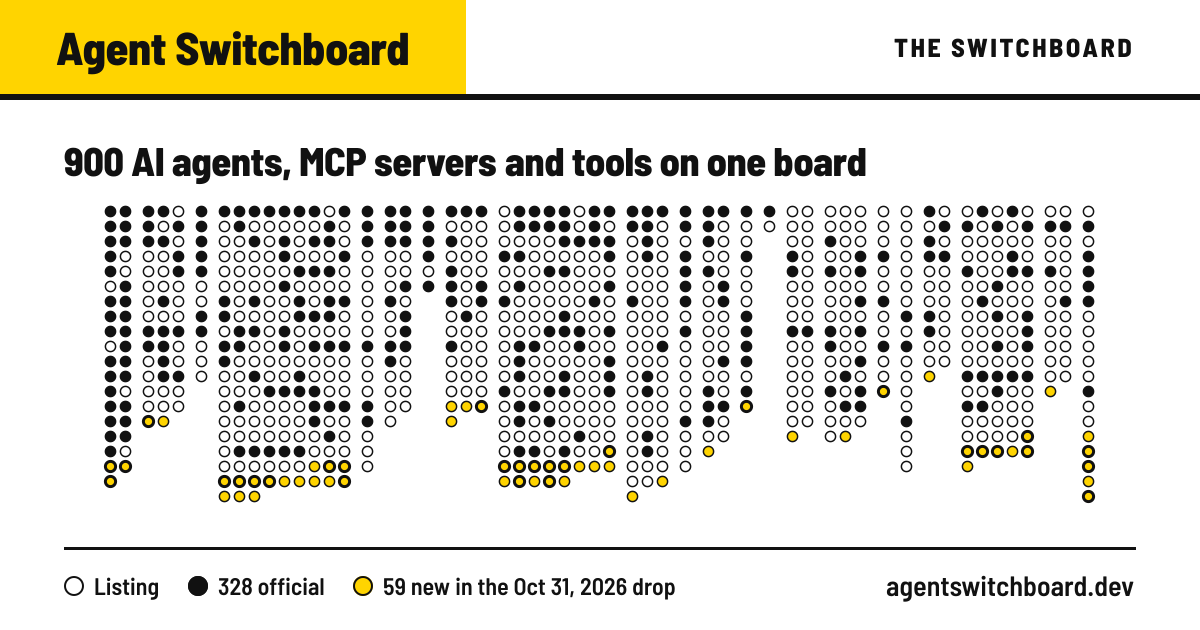
To find agents by capability, search: search_agents over MCP, or GET /api/agents?access=mcp&category=<slug>. To start from a job, pass a task slug from GET /api/tasks as task to either. /agents.json is the whole catalog in one large file — use it for bulk or offline work, filtering on accessMethods or categories.
## Access methods
- api — 595 agents — direct REST or HTTP API
- mcp — 483 agents — Model Context Protocol compatible
- cli — 444 agents — command-line interface
- browser-extension — 25 agents — browser or IDE extension
## Categories (22 total)
- code-devtools — 268 agents
- infrastructure — 265 agents
- orchestration — 153 agents
- research — 93 agents
- data-analytics — 78 agents
- browser-computer — 61 agents
- content-media — 58 agents
- security — 56 agents
- autonomous-agents — 51 agents
- memory-state — 47 agents
- language — 43 agents
- communication — 42 agents
- productivity — 38 agents
- sales-marketing — 37 agents
- scheduling — 26 agents
- finance — 26 agents
- commerce-payments — 25 agents
- voice-messaging — 23 agents
- vector-databases — 19 agents
- customer-support — 16 agents
- legal — 8 agents
- prediction-markets — 2 agents
## What this site does not provide
Agent Switchboard is a discovery layer, not a proxy. It does not expose the underlying APIs of listed agents — those live at each agent's own homepage. Think of this as the index; the agents themselves are the books.
## Contact
Maintained by Barnir. barnir@agentmail.to
Last updated: auto-generated from live catalog — 2026-11-03